Description
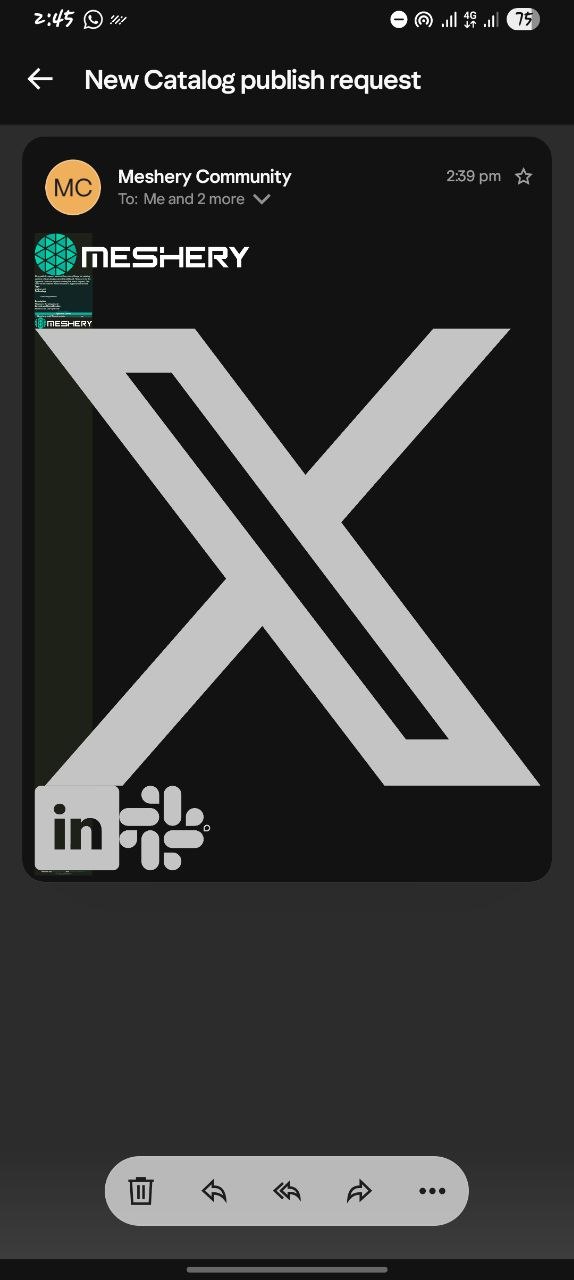
The “New Catalog publish request” email sent from Meshery Community renders incorrectly on mobile. The social icons in the footer (X, LinkedIn, Slack) display at a very large size, and the main email content is shrunk into a tiny, unreadable column at the top left, so the message can’t be read.
Steps to reproduce
- Trigger or receive a “New Catalog publish request” email (sent from Meshery Community).
- Open the email in a mobile email client.
- Observe the layout.
Expected behavior
The email body is readable at full width, and the footer social icons are small, fixed-size icons.
Actual behavior
- The X icon fills most of the screen.
- The LinkedIn and Slack icons are also oversized.
- The email text is squashed into a narrow strip at the top left and is unreadable.
Screenshot
Environment
- Device: Samsung Galaxy A14
- Email client: Yahoo Mail
- Theme: Dark mode
- Received: 22 Oct 2026, 2:39 pm
Possible cause
The icon images may be missing explicit width and height attributes, or the template may rely on CSS that some mobile clients strip or ignore. Dark mode could also be changing how the layout renders. I haven’t confirmed this.
Suggested fix
- Set explicit
widthandheightattributes on the social icon<img>tags, not only in CSS. - Use a table-based, mobile-safe layout with a max width (for example 600px).
- Test in Gmail, Outlook, and Apple Mail, in both light and dark mode.
I’m happy to work on this if it’s something the community can edit.